Source: BeSA (Become a Solutions Architect) Cohort 10, Week 1 — technical session by Ashish & Parna, fireside chat with Matt Wood (AWS Chief AI & Technology Officer). Hands-on labs: AWS Workshop Studio, “Getting Started with Amazon Bedrock AgentCore,” Labs 1–6 of 9, completed end to end.
How to use this page
This is one of three linked pieces on Week 1, each doing a different job — start wherever matches what you need:
- The LinkedIn post — the 60-second version: key takeaways, a summary image, a link back here.
- This page — the full theory (the six-layer model, where an agent earns its name) plus what I actually built hands-on, one row per lab.
- The GitHub repo — go here if you want to do this yourself: a plain-language, step-by-step digest of all 6 labs — the real problem each one solves, what AWS gives you, what I did, and a diagram — written for someone trying AWS/GenAI agent-building for the first time. No AWS code reproduced; links to the real workshop throughout.
The one idea to keep
An “agent” isn’t a smarter chatbot — it’s a system that runs a loop: Reason → Act → Observe, repeating until the goal is met or it decides to stop. A traditional app follows one fixed path; an agent chooses its own path each time, which is exactly what makes it powerful and exactly what makes it hard to govern.
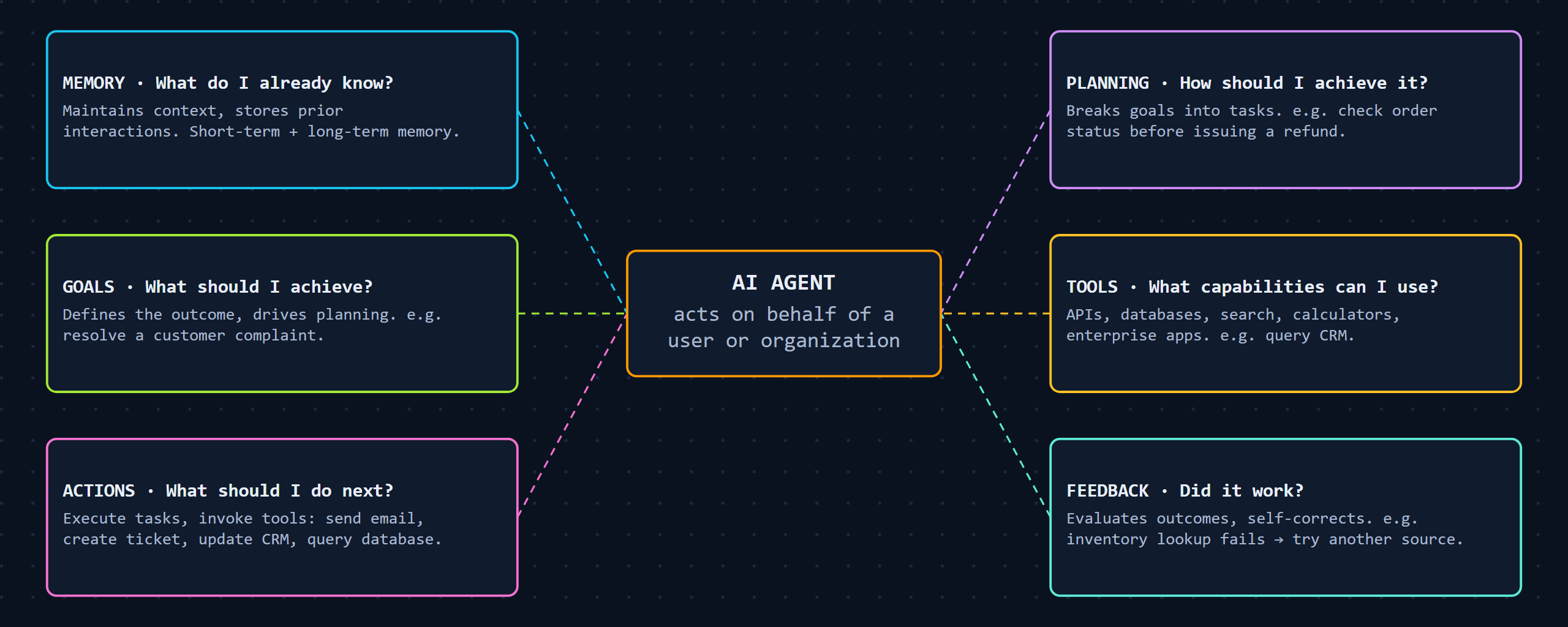 Six parts of an AI agent — BeSA Week 1 deck, p.25
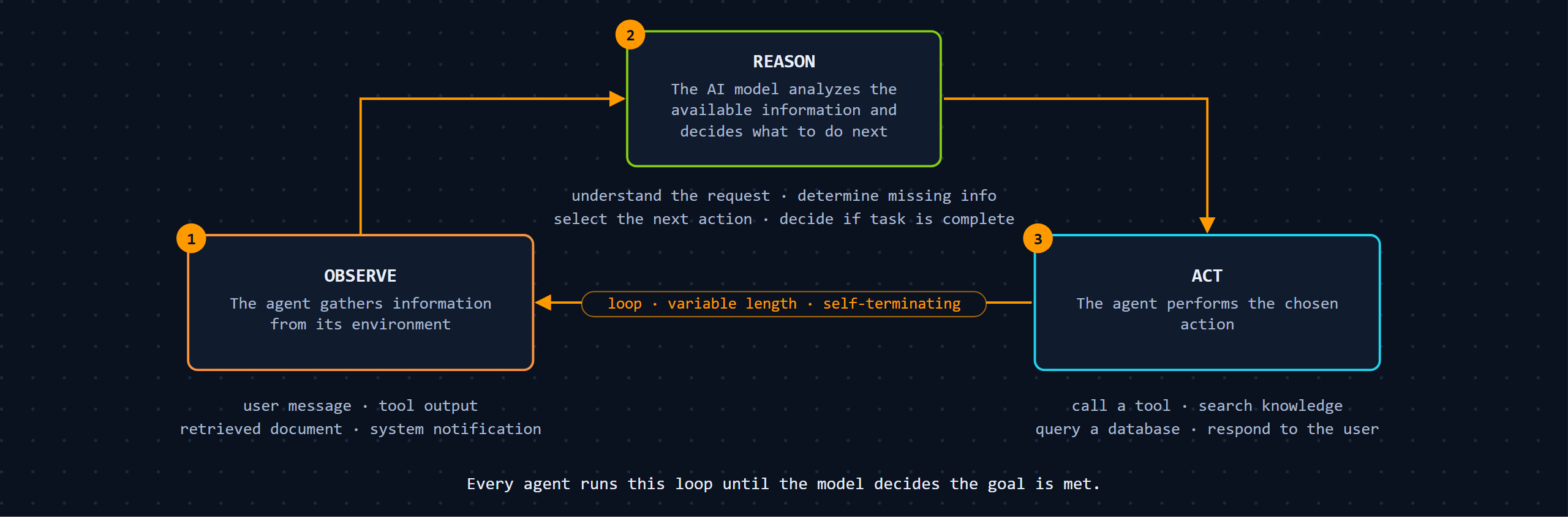 The agent loop in full — BeSA Week 1 deck, p.27-28
Key takeaways
- Traditional app: Request → fixed logic → Response. Predictable, direct path.
- Agentic app: Request → Reason → Tool → Observe → Reason (repeat) → Response. Variable path, variable time.
- That variability is why “agent demand” isn’t HTTP request volume — concurrency, active tasks, and queue depth become the real scaling signals once an agent is live.
Use it
Before calling anything “agentic,” ask: does it actually reason and choose a variable path, or is it just a single model call wrapped in a nicer UI? If the path is fixed, it’s not an agent — and that’s fine, but call it what it is.
How AWS solves it: six layers, six named services
The deck doesn’t stop at “an agent needs six things.” Every layer maps to real AWS services you can go deploy — this is the actual production ladder, not a conceptual diagram:
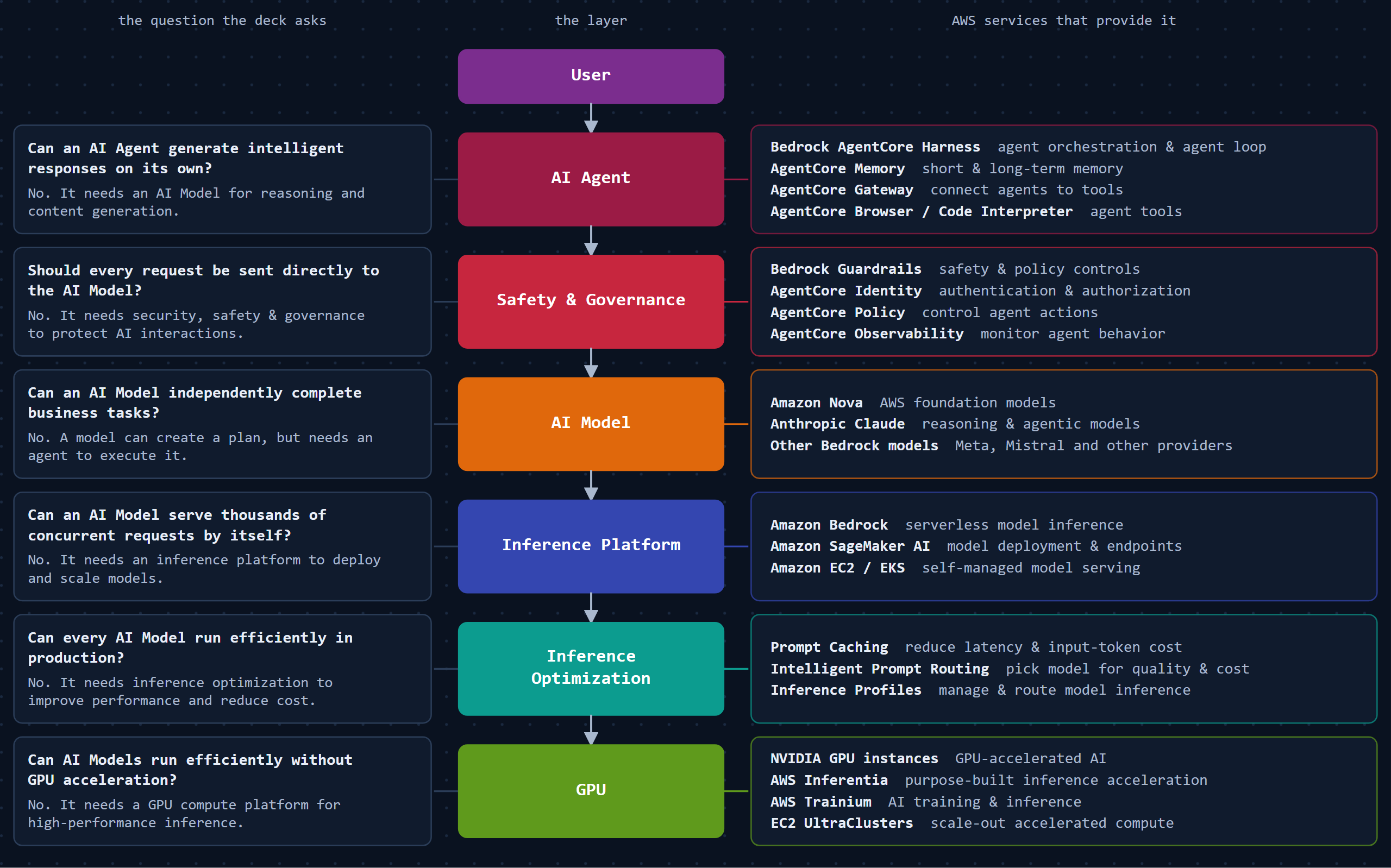 The production ladder — BeSA Week 1 deck, p.31-32
AgentCore itself isn’t one service — it’s a composable platform. Here’s how its pieces actually connect to each other at runtime:
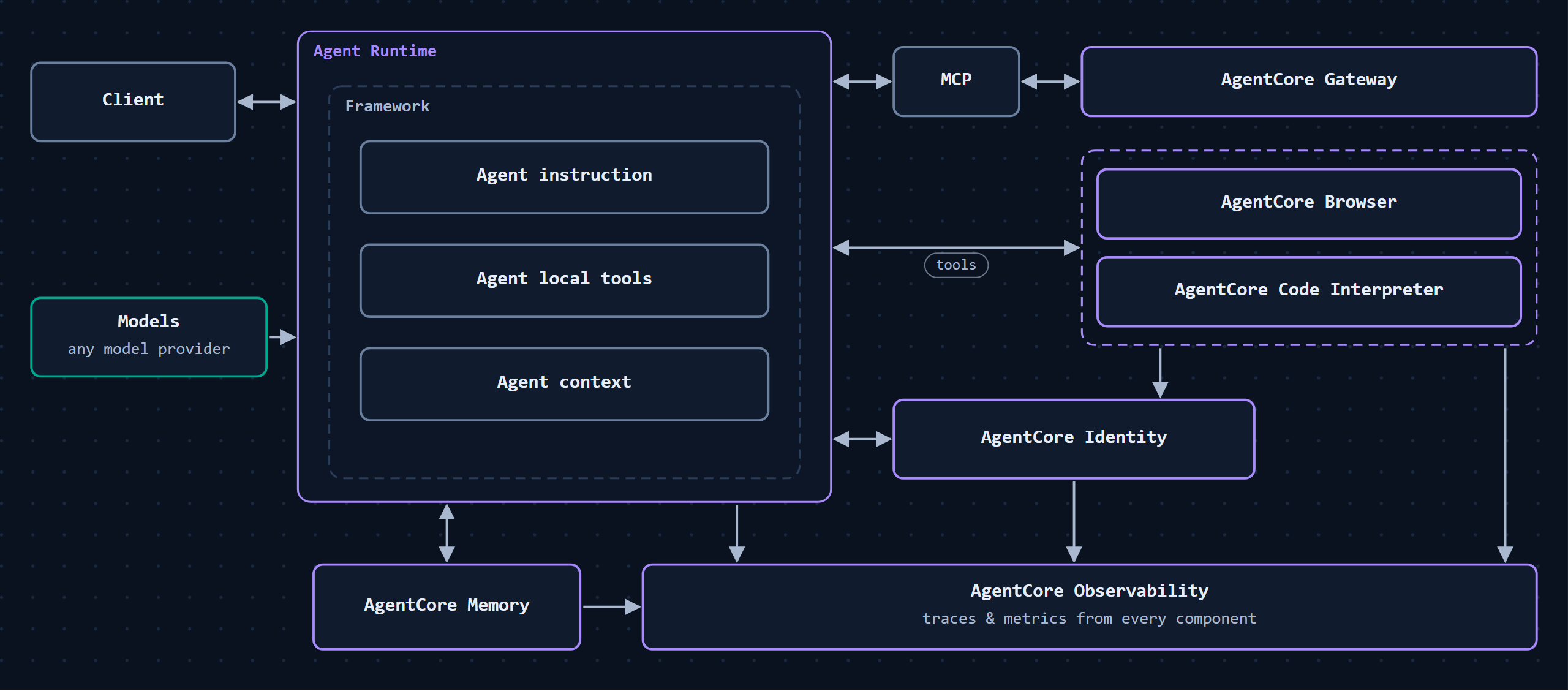 How AgentCore components connect — BeSA Week 1 deck, p.35
And the full platform map, grouped by job — harness, context, tools, optimization, environment, and platform control:
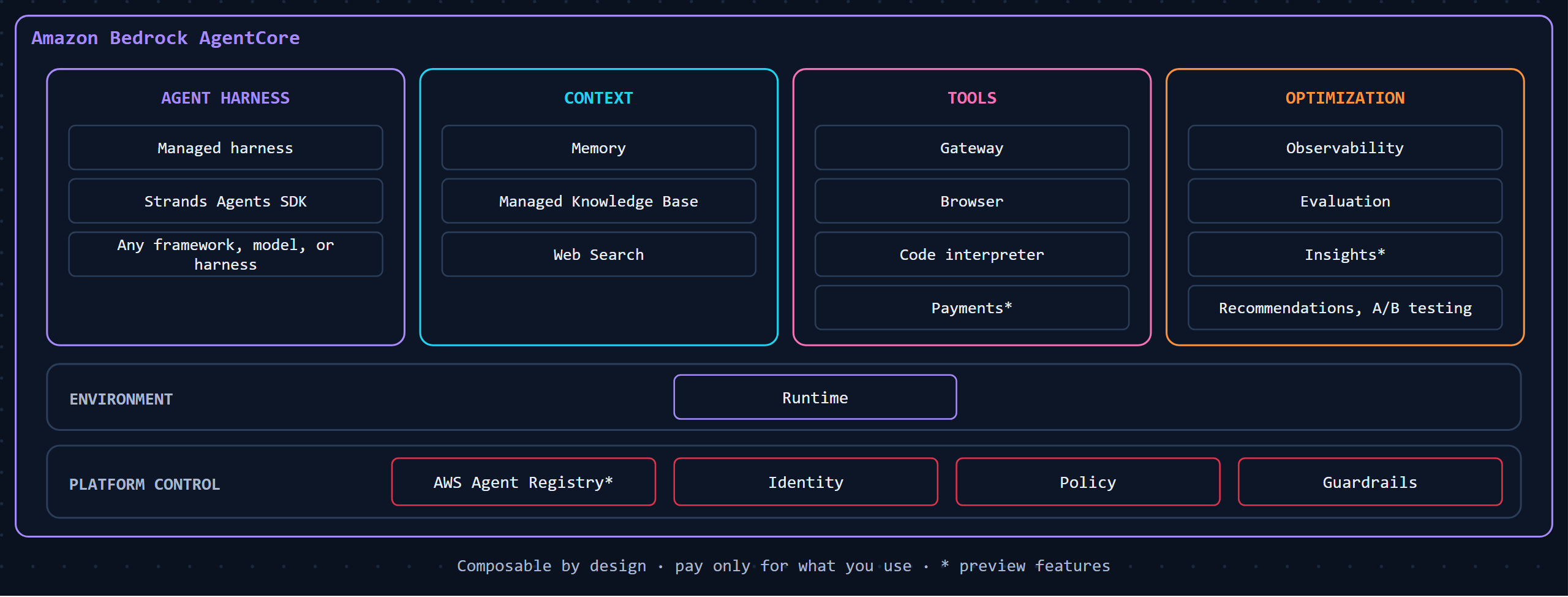 The AgentCore platform map — BeSA Week 1 deck, p.34
Beyond the workshop’s example: where this actually applies
The AWS workshop teaches all six layers through one example — a customer-support agent. That’s a good teaching device, but the six layers are the actual reusable part, not the customer-support framing. Three places I’d point this at, each one driven by a different layer being the real reason you’d reach for an agent:
- Insurance claims triage. Most insurers run claims/policy logic on decades-old systems nobody’s rewriting. The Gateway layer (Lab 3’s mechanism) is the fit here — it exposes an existing claims system as a tool an agent can call without touching that system’s code, which matters because an adjuster manually cross-referencing 3–4 legacy systems per claim is the actual cost being solved, not “AI for insurance” in the abstract.
- Healthcare intake or triage. Here the draw isn’t the model, it’s Identity + Observability (Lab 4’s mechanism): knowing exactly which patient an agent is acting for, and having a full trace of every decision it made, isn’t a nice-to-have in healthcare — it’s close to a compliance requirement.
- Where NOT to use this: loan eligibility screening. Worth including because it’s a real limit, not a feel-good example. The Week 1 deck itself calls this out: “approve/reject on predefined income and credit-score rules” belongs in a rule-based decision, not an agent — full explainability is required out of the box, and an agent’s variable reasoning path is the wrong tool for that. Knowing when not to reach for this is as much the point of Week 1 as the six layers themselves.
Which piece to read next
If one of those three problems sounds like something you’re actually facing, the GitHub repo is the next stop — it walks through building the actual mechanism (Gateway, Memory, Identity, Observability) lab by lab, in plain language, with AWS’s own workshop linked at every step.
Hands-on: I built this myself
Source: AWS Workshop Studio, “Getting Started with Amazon Bedrock AgentCore” (c770f35f-90a9-4e02-8985-4ef912bddb77), Labs 1–6 of 9, completed end to end.
The theory above is the six-layer model. The workshop is where I built one customer-support agent and added a real layer to it, lab by lab:
 The hands-on build, lab by lab — source: AWS Workshop Studio, Labs 1–6 of 9
| Lab | What I built | One-line proof |
|---|---|---|
| 1 · Agent Prototype | Strands agent, 2 tools, MCP web search, deployed with agentcore deploy | A model + tools ≠ a production agent — no memory, no shared tools, no security yet |
| 2 · Memory | AgentCore Memory, SEMANTIC + SUMMARIZATION strategies | Session persistence and long-term memory are different things — only Memory survives a new session |
| 3 · Gateway | Exposed an existing Lambda as an MCP tool, zero changes to the Lambda | Tools don’t have to live in the agent’s own codebase |
| 4 · Secure & Observe | Session isolation proven against memory recall, side by side; pulled real OpenTelemetry traces | “Works in my session” and “remembers this user” are different claims — and it’s all being traced whether you look or not |
| 5 · Evaluate | 3 LLM-judge evaluators at 100% sampling — real scores, e.g. 73% goal success, 84% correctness | “The demo worked” and “the agent is good” are different questions — now one has a number |
| 6 · Frontend | Flask + Cognito chat UI calling the AgentCore REST API directly | A solid backend isn’t done until someone who isn’t you can open a browser and use it |
Each lab closes exactly one gap the last one opened, in the order production actually demands: prototype → memory → shared tools → security/observability → proof of quality → a human-facing door. (Labs 7–9 — policies, zero-code harness, quality optimization — weren’t part of this run.)
Full problem/approach/analysis/takeaway writeup per lab (no AWS code reproduced — digest only): github.com/narenmak17/besa-w1-agentcore-customer-support-agent.
🎥 Session recordings, recorded and shared by the BeSA Batch 10 volunteer team: hands-on walkthrough, technical track playlist, behavioural track playlist.
Credit
All credit for the Week 1 teaching goes to Ashish, Parna, and Matt Wood (AWS Chief AI & Technology Officer) for the fireside chat — this page is my own write-up of what I learned and built, not an AWS-produced resource. BeSA Cohort 10 is a free, community-run AWS programme taught entirely by volunteers on their own time: Jeff, Prasad Rao, Nisha, Krishna, Kanti, Aanchal, Shorena, Anmol, Robert, and Ravali built five more weeks exactly like this one. BeSA has run 9 batches since 2022 — 23,000+ members, 1,000+ certified.
💬 Comments